Sketch Bug: Using Sketch-Based Input for Interactive Code Debugging
Pith reviewed 2026-06-30 14:30 UTC · model grok-4.3
The pith
Sketch-like pen input supports execution control tasks in debugging but introduces challenges in precision and gesture recall.
A machine-rendered reading of the paper's core claim, the machinery that carries it, and where it could break.
Core claim
The results show that sketch-like input can support these execution-control tasks, while also introducing challenges in precision, recognition, and gesture recall. Our findings suggest that pen input is most promising where debugger interactions benefit from spatial grounding or continuous movement, rather than as a wholesale replacement for conventional debugging controls.
What carries the argument
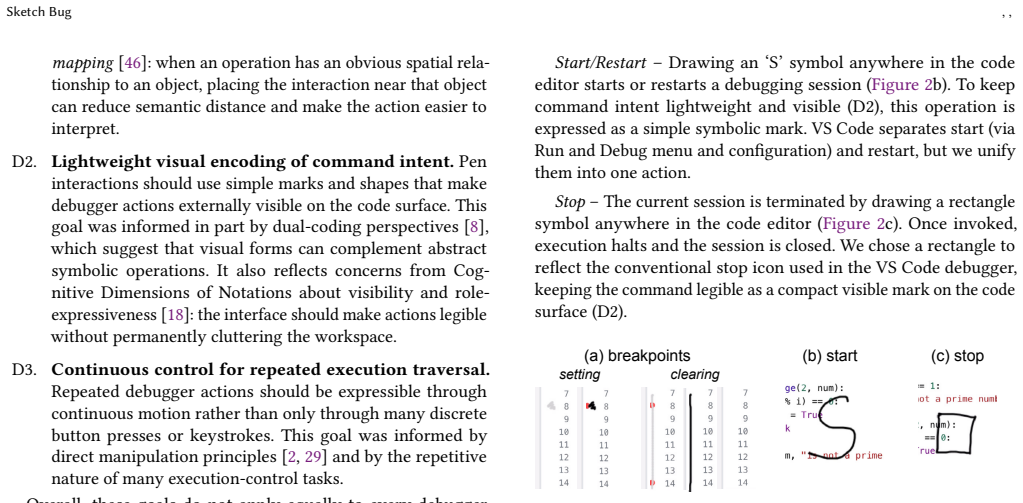
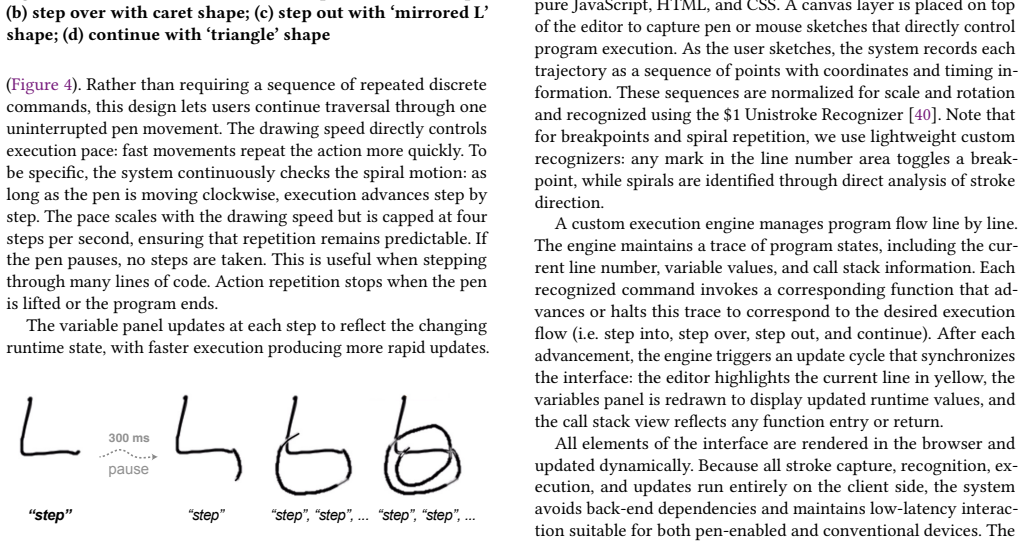
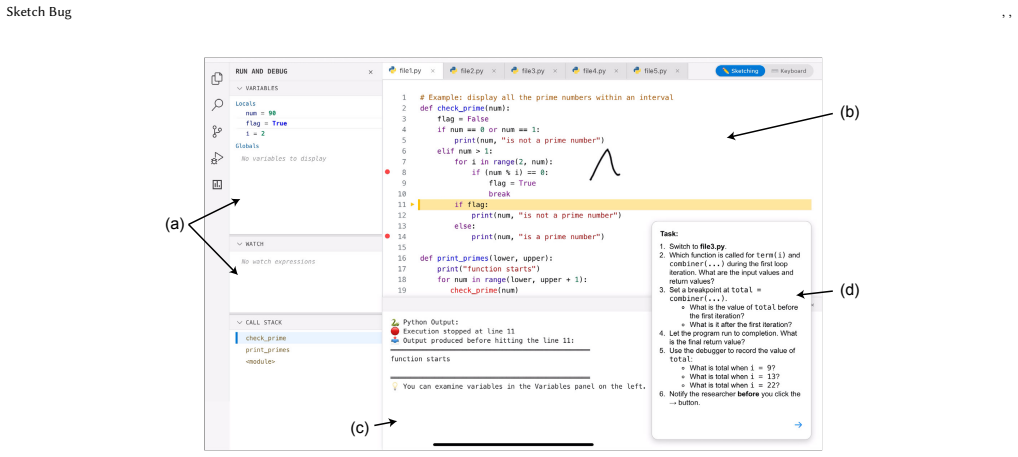
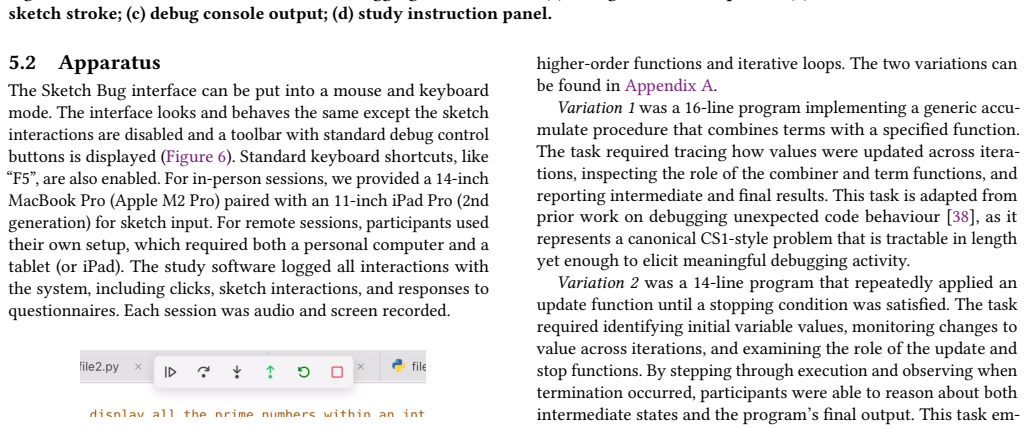
Sketch interface using gesture recognition combined with Python execution tracing in an editor, where lightweight marks set breakpoints, strokes control execution, and extended strokes into spirals repeat traversals.
If this is right
- Sketch input enables programmers to set breakpoints and control execution steps via drawing.
- Pen-based methods are viable for spatial or continuous debugging actions.
- Precision, recognition accuracy, and gesture recall remain key hurdles to overcome.
- Conventional mouse and keyboard remain preferable for many debugging interactions.
Where Pith is reading between the lines
- Deploying the prototype in actual development environments could test its utility in complex, real projects.
- Gesture sets might be standardized across tools to improve recall.
- Combining sketch input with other modalities could address precision issues.
- Similar techniques could extend to debugging in visual programming languages.
Load-bearing premise
The specific debugging tasks and the prototype used in the controlled study are representative of everyday debugging practice.
What would settle it
Observing that professional developers using the sketch interface on their daily work show no measurable improvement in debugging efficiency or preference over standard interfaces.
Figures


read the original abstract
We investigate sketch-like pen input as an alternative way to support execution control in interactive debugging. In our interface, programmers draw lightweight marks to set breakpoints, use symbolic strokes to control execution, and extend strokes into spirals to repeat traversal actions. The prototype combines gesture recognition with Python execution tracing in a conventional editor interface. In a controlled study with 24 programmers, we compared the sketch interface with conventional mouse-and-keyboard input on debugging tasks that required breakpoint placement, step-wise execution, and runtime state inspection. The results show that sketch-like input can support these execution-control tasks, while also introducing challenges in precision, recognition, and gesture recall. Our findings suggest that pen input is most promising where debugger interactions benefit from spatial grounding or continuous movement, rather than as a wholesale replacement for conventional debugging controls.
Editorial analysis
A structured set of objections, weighed in public.
Referee Report
Summary. The paper presents 'Sketch Bug', an interface using sketch-based pen input for debugging tasks: drawing marks to set breakpoints, symbolic strokes for execution control (e.g., stepping), and extending strokes into spirals to repeat actions. The prototype integrates gesture recognition with Python execution tracing in a standard editor. It reports a controlled study with 24 programmers comparing the sketch interface to conventional mouse-and-keyboard input on tasks requiring breakpoint placement, step-wise execution, and runtime state inspection. Results indicate sketch input can support these tasks but introduces challenges in precision, recognition, and gesture recall; the authors conclude it is most promising for interactions benefiting from spatial grounding or continuous movement rather than as a full replacement.
Significance. If the empirical results hold, this contributes to HCI research on programming tools by providing evidence for an alternative input modality in debugging, highlighting scenarios where pen input may offer advantages over discrete controls. The tempered conclusions (not claiming wholesale replacement) and focus on specific benefits strengthen the work's utility for guiding future interface designs in spatially-oriented debugging contexts.
major comments (1)
- [Methods] Methods section (study design): The description of the controlled tasks does not specify code complexity details such as presence of loops, nested conditionals, repeated state inspections, or multi-file navigation. This is load-bearing for assessing whether the observed support for breakpoint, stepping, and inspection tasks generalizes beyond short single-file snippets, as precision and recall challenges could compound in realistic sessions.
minor comments (2)
- [Abstract] Abstract and results: No statistical details (e.g., means, p-values, error bars, or effect sizes) are provided for the comparison between interfaces, making it difficult to evaluate the strength of the 'can support' claim.
- [Results] The paper should include a table or figure summarizing task performance metrics across conditions to allow direct comparison.
Simulated Author's Rebuttal
We thank the referee for their constructive review and positive assessment of the work's contribution. We address the major comment below.
read point-by-point responses
-
Referee: [Methods] Methods section (study design): The description of the controlled tasks does not specify code complexity details such as presence of loops, nested conditionals, repeated state inspections, or multi-file navigation. This is load-bearing for assessing whether the observed support for breakpoint, stepping, and inspection tasks generalizes beyond short single-file snippets, as precision and recall challenges could compound in realistic sessions.
Authors: We agree that explicit details on task code complexity are important for evaluating generalizability. Our study tasks used short single-file Python programs (20-40 LOC) containing loops, nested conditionals, and multiple state inspections to require repeated stepping and inspection actions, but without multi-file navigation. We will revise the Methods section to include quantitative metrics (e.g., LOC, control-flow nesting depth, number of inspection points) and example code snippets so readers can assess how precision/recall issues might scale. revision: yes
Circularity Check
No circularity: empirical user study grounded in external participant data
full rationale
The paper reports a controlled study with 24 programmers measuring task performance on breakpoint placement, step-wise execution, and state inspection using sketch input versus mouse/keyboard. All claims rest on observed participant outcomes against external benchmarks rather than any derivation, fitted parameters, equations, or self-citation chains. No self-definitional steps, predictions that reduce to inputs, or load-bearing self-citations appear in the abstract or study description. This matches the default expectation for non-circular empirical HCI work.
Axiom & Free-Parameter Ledger
axioms (1)
- domain assumption Standard assumptions of controlled user studies in HCI (task representativeness, participant pool validity, absence of major learning effects between conditions)
Reference graph
Works this paper leans on
-
[1]
Sven Amann, Sebastian Proksch, Sarah Nadi, and Mira Mezini. 2016. A study of visual studio usage in practice. In2016 ieee 23rd international conference on software analysis, evolution, and reengineering (saner), Vol. 1. IEEE, 124–134
2016
-
[2]
Beaudouin-Lafon
M. Beaudouin-Lafon. 2000. Instrumental interaction: an interaction model for designing post-WIMP user interfaces.Proceedings of the SIGCHI conference on Human Factors in Computing Systems(2000). http://dl.acm.org/citation.cfm?id= 332473
2000
-
[3]
Ivan Beschastnikh, Patty Wang, Yuriy Brun, and Michael D. Ernst. 2016. Debug- ging distributed systems.Commun. ACM59, 8 (July 2016), 32–37. doi:10.1145/ 2909480
2016
-
[4]
Patrick D Bridge and Shlomo S Sawilowsky. 1999. Increasing physicians’ aware- ness of the impact of statistics on research outcomes: comparative power of the t-test and Wilcoxon rank-sum test in small samples applied research.Journal of clinical epidemiology52, 3 (1999), 229–235
1999
-
[5]
John Brooke et al. 1996. SUS-A quick and dirty usability scale.Usability evaluation in industry189, 194 (1996), 4–7
1996
-
[6]
Sarah Buchanan and Joseph J Laviola Jr. 2014. Cstutor: A sketch-based tool for visualizing data structures.ACM Transactions on Computing Education (TOCE) 14, 1 (2014), 1–28
2014
-
[7]
Renata Castelo-Branco, Inês Caetano, Inês Pereira, and António Leitão. 2022. Sketching algorithmic design.Journal of Architectural Engineering28, 2 (2022), 04022010
2022
-
[8]
James M. Clark and A. Paivio. 1991. Dual coding theory and education.Educa- tional Psychology Review3 (1991), 149–210. https://doi.org/10.1007/BF01320076
-
[9]
Richard C Davis, T Scott Saponas, Michael Shilman, and James A Landay. 2007. SketchWizard: Wizard of Oz prototyping of pen-based user interfaces. InProceed- ings of the 20th annual ACM symposium on User interface software and technology. 119–128
2007
-
[10]
Rafael del Vado Vírseda and Fernando Pérez Morente. 2012. A Semantic Frame- work for the Declarative Debugging of Wrong and Missing Answers in Declar- ative Constraint Programming. Inunknown. https://api.semanticscholar.org/ CorpusId:14922005
2012
-
[11]
Pierre Dragicevic. 2016. Fair statistical communication in HCI. InModern statistical methods for HCI. Springer, 291–330
2016
-
[12]
Will Epperson, Gagan Bansal, Victor C Dibia, Adam Fourney, Jack Gerrits, Erkang Zhu, and Saleema Amershi. 2025. Interactive Debugging and Steering of Multi- Agent AI Systems. InProceedings of the 2025 CHI Conference on Human Factors in Computing Systems. 1–15
2025
-
[13]
Leslie Gennari, Levent Burak Kara, Thomas F Stahovich, and Kenji Shimada. 2005. Combining geometry and domain knowledge to interpret hand-drawn diagrams. Computers & Graphics29, 4 (2005), 547–562
2005
- [14]
-
[15]
Transparent Statistics in Human-Computer Interaction Working Group. 2019. Transparent Statistics Guidelines.https://transparentstats. github. io/guidelines (2019)
2019
-
[16]
Dan Hao, Lingming Zhang, Lu Zhang, Jiasu Sun, and Hong Mei. 2009. VIDA: Vi- sual interactive debugging. In2009 IEEE 31st International Conference on Software Engineering. IEEE, 583–586
2009
-
[17]
Sandra G Hart and Lowell E Staveland. 1988. Development of NASA-TLX (Task Load Index): Results of empirical and theoretical research. InAdvances in psy- chology. Vol. 52. Elsevier, 139–183
1988
-
[18]
Javier Luis Cánovas Izquierdo and Jordi Cabot. 2016. Collaboro: a collaborative (meta) modeling tool.PeerJ Comput. Sci.2 (2016), e84. https://api.semanticscholar. org/CorpusId:5751358
2016
- [19]
-
[20]
Joonho Kim and Karan Singh. 2024. Squidgets: Sketch-based Widget Design and Direct Manipulation of 3D Scene.ArXivabs/2402.06795 (2024). https: //api.semanticscholar.org/CorpusId:267627231
work page internal anchor Pith review Pith/arXiv arXiv 2024
-
[21]
Amy J Ko and Brad A Myers. 2004. Designing the whyline: a debugging inter- face for asking questions about program behavior. InProceedings of the SIGCHI conference on Human factors in computing systems. 151–158
2004
-
[22]
Amy J Ko, Brad A Myers, and Htet Htet Aung. 2004. Six learning barriers in end- user programming systems. In2004 IEEE Symposium on Visual Languages-Human Centric Computing. IEEE, 199–206
2004
-
[23]
Amy J. Ko, Brad A. Myers, Michael J. Coblenz, and Htet Htet Aung. 2006. An Exploratory Study of How Developers Seek, Relate, and Collect Relevant In- formation during Software Maintenance Tasks.IEEE Transactions on Software Engineering32, 12 (2006), 971–987. doi:10.1109/TSE.2006.116
-
[24]
Bogdan Korel. 2002. PELAS-program error-locating assistant system.IEEE Transactions on Software Engineering14, 9 (2002), 1253–1260
2002
-
[25]
Thomas D LaToza, Gina Venolia, and Robert DeLine. 2006. Maintaining mental models: a study of developer work habits. InProceedings of the 28th international conference on Software engineering. 492–501
2006
-
[26]
Bingxin Li, Tong Yang, Yanfang Liu, and Feng Du. 2022. Memory load differen- tially influences younger and older users’ learning curve of touchscreen gestures. Scientific Reports12, 1 (2022), 10814
2022
-
[27]
Chuanjun Li, Timothy S Miller, Robert C Zeleznik, and Joseph J LaViola Jr. 2008. AlgoSketch: Algorithm Sketching and Interactive Computation.SBIM8 (2008), 175–182
2008
-
[28]
Haolin Li and Michael J. Coblenz. 2026. A Grounded Theory of Debugging in Professional Software Engineering Practice.ArXivabs/2602.11435 (2026). https://api.semanticscholar.org/CorpusId:285540386
work page internal anchor Pith review Pith/arXiv arXiv 2026
-
[29]
Damien Masson, Sylvain Malacria, Géry Casiez, and Daniel Vogel. 2023. Direct- GPT: A Direct Manipulation Interface to Interact with Large Language Models. Proceedings of the 2024 CHI Conference on Human Factors in Computing Systems (2023). https://api.semanticscholar.org/CorpusId:263671690
2023
-
[30]
Damien Masson, Sylvain Malacria, Géry Casiez, and Daniel Vogel. 2023. Statsla- tor: Interactive translation of nhst and estimation statistics reporting styles in scientific documents. InProceedings of the 36th Annual ACM Symposium on User Interface Software and Technology. 1–14
2023
-
[31]
Fabio Petrillo, Zéphyrin Soh, Foutse Khomh, Marcelo Pimenta, Carla Freitas, and Yann-Gaël Guéhéneuc. 2016. Towards understanding interactive debugging. In 2016 IEEE International Conference on Software Quality, Reliability and Security (QRS). IEEE, 152–163
2016
-
[32]
Andrew Quinn, Jason Flinn, Michael Cafarella, and Baris Kasikci. 2022. Debugging the {OmniTable} Way. In16th USENIX Symposium on Operating Systems Design and Implementation (OSDI 22). 357–373
2022
-
[33]
Rosenberg, Rubaiat Habib Kazi, Li-Yi Wei, Haijun Xia, and Ken Perlin
K. Rosenberg, Rubaiat Habib Kazi, Li-Yi Wei, Haijun Xia, and Ken Perlin. 2024. DrawTalking: Building Interactive Worlds by Sketching and Speaking.Proceedings of the 37th Annual ACM Symposium on User Interface Software and Technology (2024). https://api.semanticscholar.org/CorpusId:266933399
2024
-
[34]
M Samadzadeh and Winai Wichaipanitch. 1993. An interactive debugging tool for C based on dynamic slicing and dicing. InProceedings of the 1993 ACM conference on Computer science. 30–37
1993
-
[35]
Vinícius CVB Segura and Simone DJ Barbosa. 2012. A combination of stroke manipulation and recognition strategies to support user interface construction and interactive behavior definition through sketching. In2012 IEEE Symposium on Visual Languages and Human-Centric Computing (VL/HCC). IEEE, 45–48
2012
-
[36]
Marjorie Skubic, Craig Bailey, and George Chronis. 2003. A sketch interface for mobile robots. InSMC’03 Conference Proceedings. 2003 IEEE International Conference on Systems, Man and Cybernetics. Conference Theme-System Security and Assurance (Cat. No. 03CH37483), Vol. 1. IEEE, 919–924
2003
-
[37]
Thomas F Stahovich. 2011. Pen-based interfaces for engineering and education. InSketch-based Interfaces and Modeling. Springer, 119–152
2011
-
[38]
Ryo Suzuki, Gustavo Soares, Andrew Head, Elena Glassman, Ruan Reis, Melina Mongiovi, Loris D’Antoni, and Bjoern Hartmann. 2017. Tracediff: Debugging unexpected code behavior using trace divergences. In2017 IEEE Symposium on Visual Languages and Human-Centric Computing (VL/HCC). IEEE, 107–115
2017
-
[39]
Matthew Thorne, David Burke, and Michiel Van De Panne. 2004. Motion doodles: an interface for sketching character motion.ACM Transactions on Graphics (ToG) 23, 3 (2004), 424–431
2004
-
[40]
Jacob O Wobbrock, Andrew D Wilson, and Yang Li. 2007. Gestures without libraries, toolkits or training: a $1 recognizer for user interface prototypes. In Proceedings of the 20th annual ACM symposium on User interface software and technology. 159–168
2007
-
[41]
Doug Woos, Zachary Tatlock, Michael D Ernst, and Thomas E Anderson. 2018. A Graphical Interactive Debugger for Distributed Systems. CoRR abs/1806.05300 (2018).arXiv preprint arXiv:1806.05300(2018)
work page internal anchor Pith review Pith/arXiv arXiv 2018
-
[42]
Ryan Yen, Jian Zhao, and Daniel Vogel. 2025. Code Shaping: Iterative Code Editing with Free-form AI-Interpreted Sketching. InProceedings of the 2025 CHI Conference on Human Factors in Computing Systems. 1–17
2025
- [43]
-
[44]
Zhenming Yuan, Hong Pan, and Liang Zhang. 2008. A novel pen-based flowchart recognition system for programming teaching. InWorkshop on Blended Learning. Springer, 55–64
2008
-
[45]
Yaqian Zhu and John Kolassa. 2018. Assessing and comparing the accuracy of various bootstrap methods.Communications in Statistics-Simulation and Computation47, 8 (2018), 2436–2453
2018
-
[46]
Barnwal, Rupayan Neogy, and Arvind Satyanarayan
Jonathan Zong, D. Barnwal, Rupayan Neogy, and Arvind Satyanarayan. 2020. Lyra 2: Designing Interactive Visualizations by Demonstration.IEEE Trans- actions on Visualization and Computer Graphics27 (2020), 304–314. https: //api.semanticscholar.org/CorpusId:221246085 8 Sketch Bug , , A Task Variations A.1 Variation 1 def accumulate(combiner, base, n, term): ...
2020
-
[47]
During the first loop iteration, which functions are called for term(i) andcombiner(...)? What are their input values and return values?
-
[48]
Set a breakpoint attotal = combiner(...)
-
[49]
What is the value oftotalbefore the first iteration?
-
[50]
What is the value oftotalafter the first iteration?
-
[51]
What is the final return value?
Let the program run to completion. What is the final return value?
-
[52]
Use the debugger to record the value oftotal: •What istotalwheni = 9? •What istotalwheni = 13? •What istotalwheni = 22? A.2 Variation 2 def apply_until(stop_fn, update_fn, initial): value = initial while not stop_fn(value): value = update_fn(value) return value def greater_than_100(x): return x > 100 def double_plus_one(x): return 2 * x + 1 apply_until(gr...
-
[53]
Set a breakpoint at the first line insideapply_until(): value = initial
-
[54]
Then answer: •What is the value ofinitial? •What functions were passed asstop_fnandupdate_fn? •What is the initial value ofvalue?
Run the program until it hits the breakpoint. Then answer: •What is the value ofinitial? •What functions were passed asstop_fnandupdate_fn? •What is the initial value ofvalue?
-
[55]
Step Over until you hit the loop guard, i.e., while not stop_fn(value):, for the second time
Restart the debugger. Step Over until you hit the loop guard, i.e., while not stop_fn(value):, for the second time. •What is the new value ofvalue?
-
[56]
•What is the function name? •What is the input? •What is the return value?
Whenvalue = 63, step into the function call. •What is the function name? •What is the input? •What is the return value?
-
[57]
What is the return value of theapply_untilcall? B Interview Questions
-
[58]
How did using sketching compare to how you typically interact with a debugger?
-
[59]
Were there moments when using sketches felt especially helpful or intu- itive?
-
[60]
Were there moments when using sketches felt especially challenging?
-
[61]
How did using a pen or drawing gestures affect your experience?
-
[62]
If you could change or add new functionalities for sketches, what would you most like to have?
-
[63]
In what scenarios do you think this sketch-based debugging approach has the most potential for widespread use?
-
[64]
Mean differences are reported aswimp−sketch
Is there anything you’d like to share? C Statistical Results Table 1: Workload comparisons betweensketchandwimp. Mean differences are reported aswimp−sketch. Measure 95% CI Wilcoxon (𝑊,𝑝) Mental Demand [-2.898, 0.880]𝑊=102.500, 𝑝=0.4341 Physical Demand [-2.657, 3.206]𝑊=113.500, 𝑝=0.9445 Effort [-3.218, 2.078]𝑊=116.000, 𝑝=0.7325 Performance [-0.002, 2.509]...
discussion (0)
Sign in with ORCID, Apple, or X to comment. Anyone can read and Pith papers without signing in.