MM-BizRAG: Rethinking Multimodal Retrieval-Augmented Generation for General Purpose Enterprise Q&A
Pith reviewed 2026-06-28 09:50 UTC · model grok-4.3
The pith
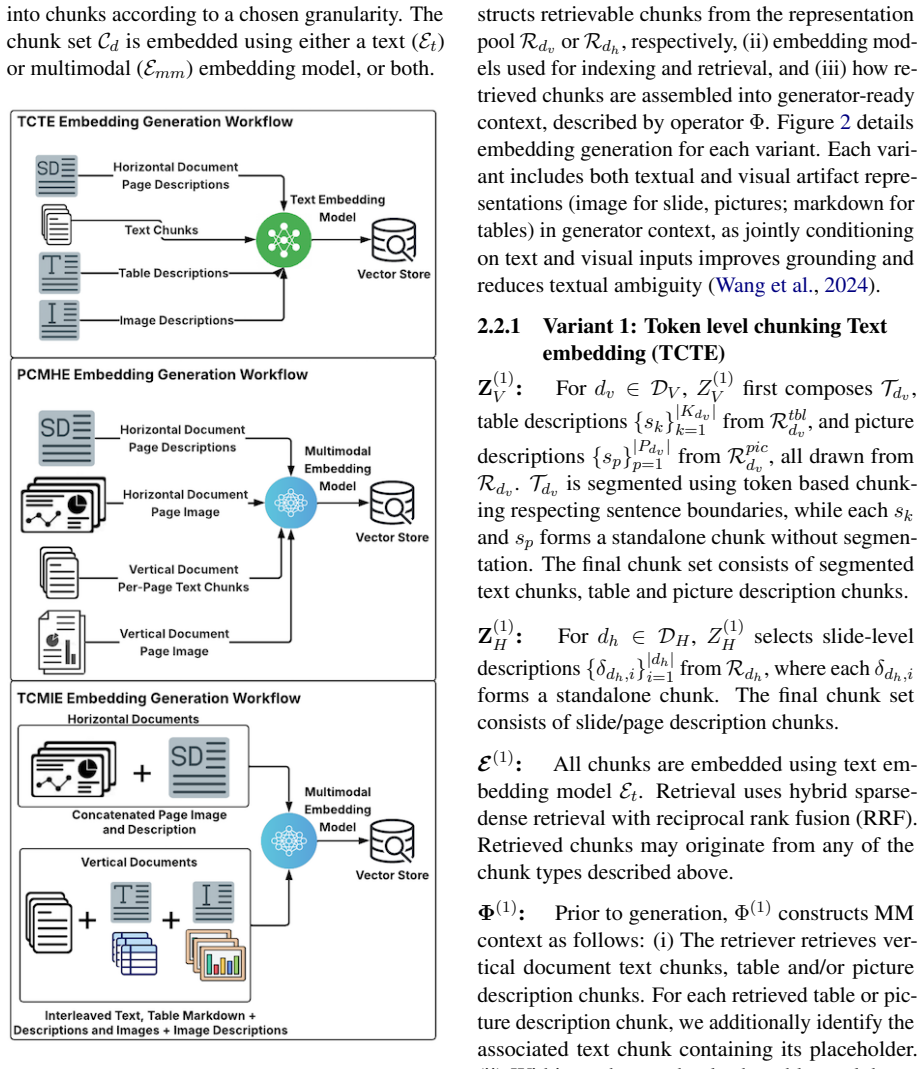
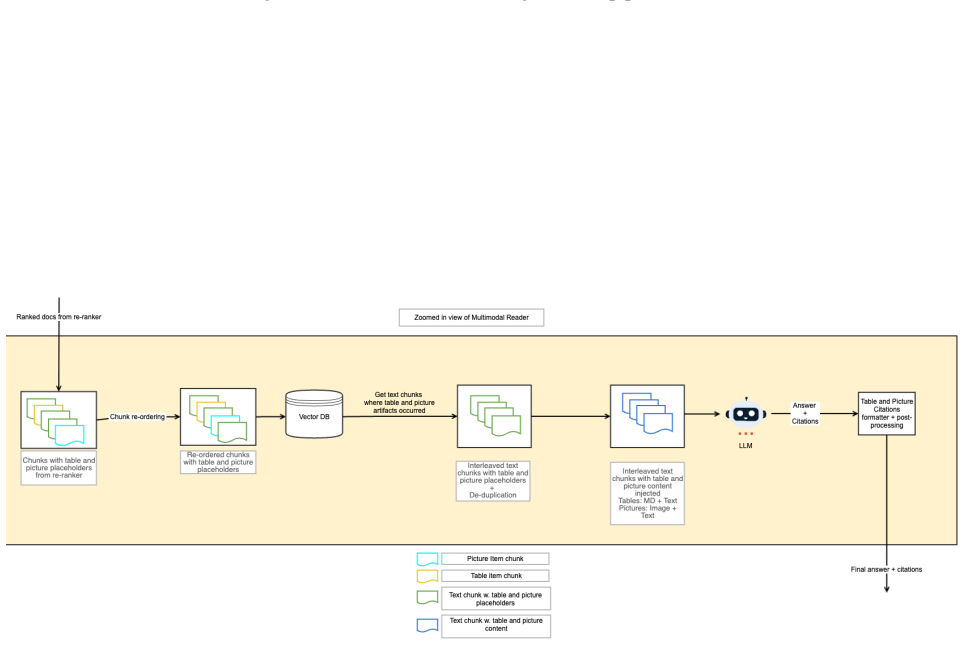
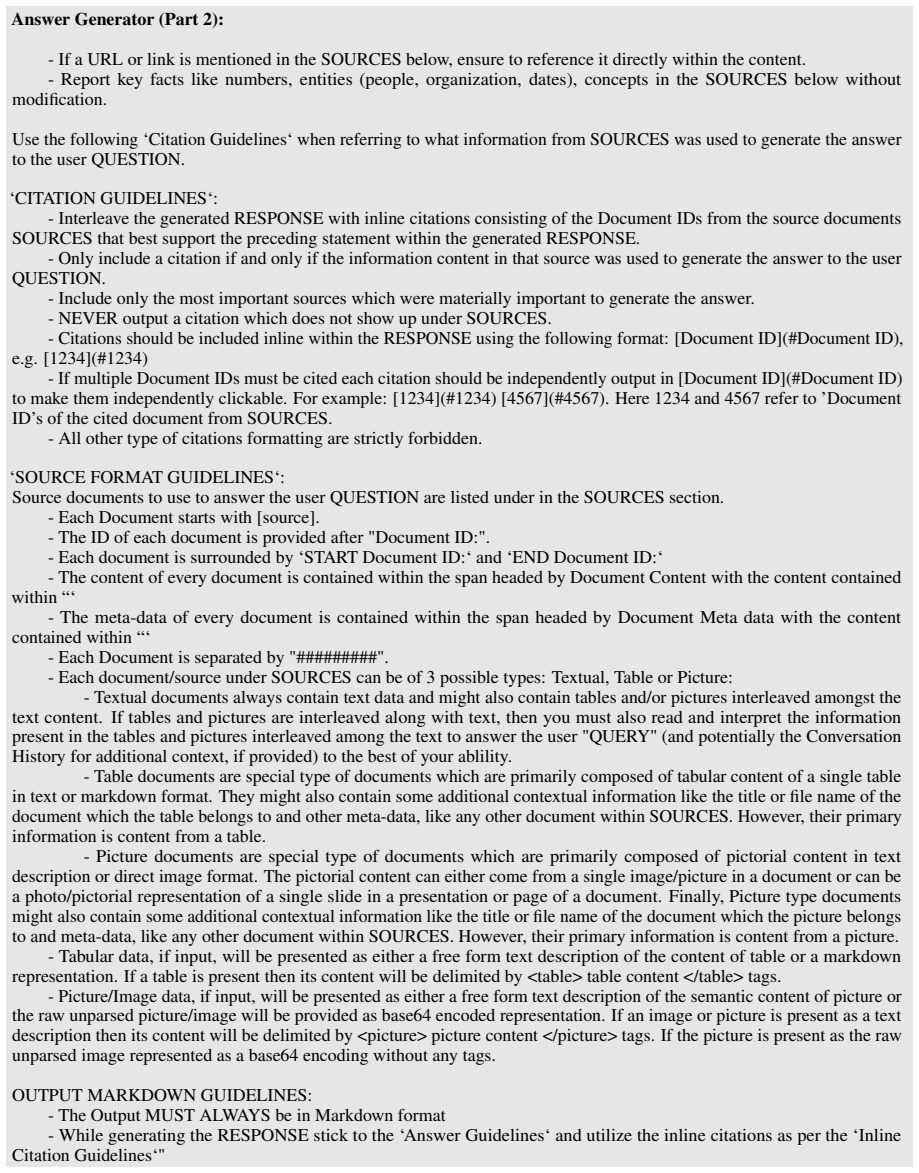
MM-BizRAG routes enterprise documents through orientation-specific parsing pipelines to extract explicit layout structure before retrieval and generation.
A machine-rendered reading of the paper's core claim, the machinery that carries it, and where it could break.
Core claim
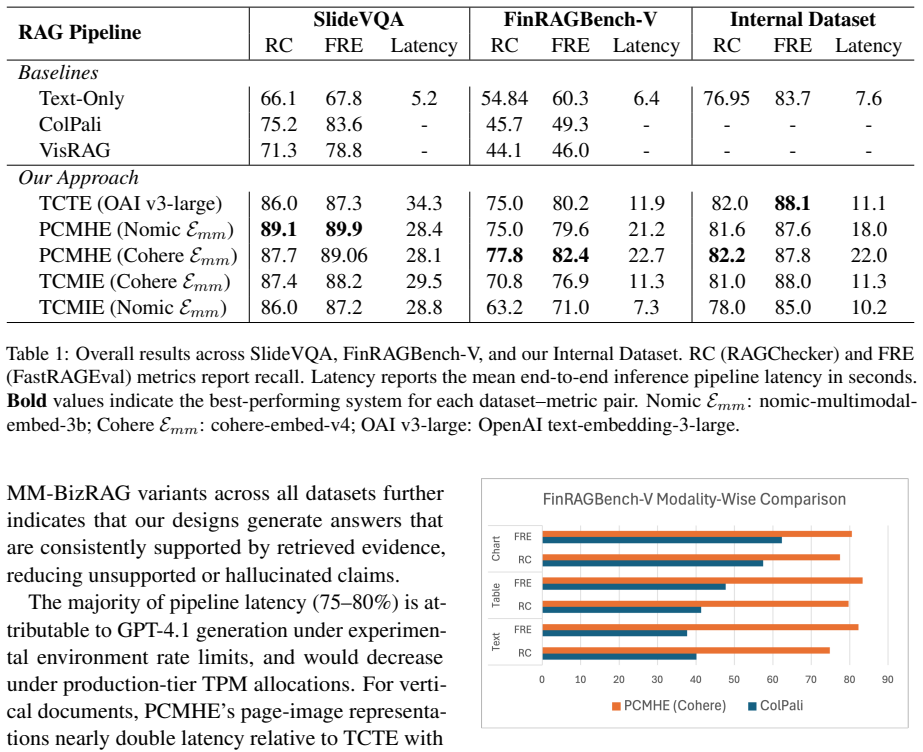
By dynamically routing documents to orientation-specific ingestion pipelines, applying explicit layout-aware parsing to vertically structured material and holistic representations to horizontally structured material, then using placeholder-based alignment to preserve order, MM-BizRAG produces retrieval and generation outputs that outperform page-image baselines without any model fine-tuning.
What carries the argument
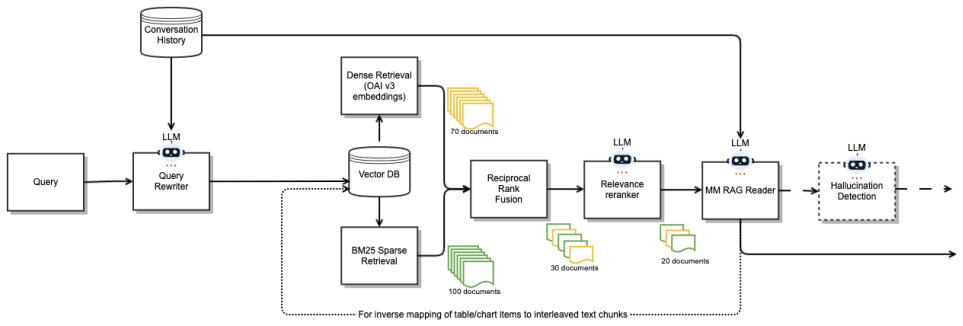
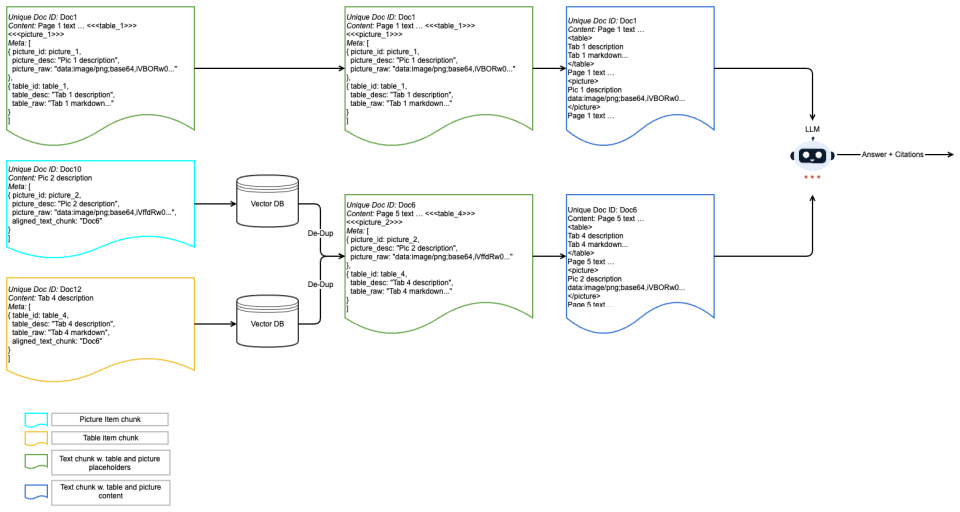
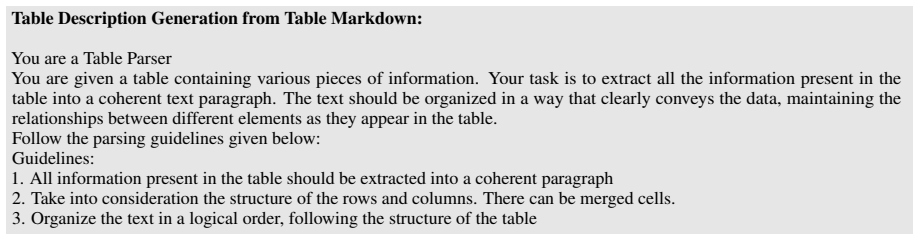
Document structure-aware split that routes to orientation-specific ingestion pipelines, combined with placeholder-based positional alignment and inference-time multimodal assembly.
If this is right
- Explicit layout parsing improves answer quality most on vertically oriented reports and tables.
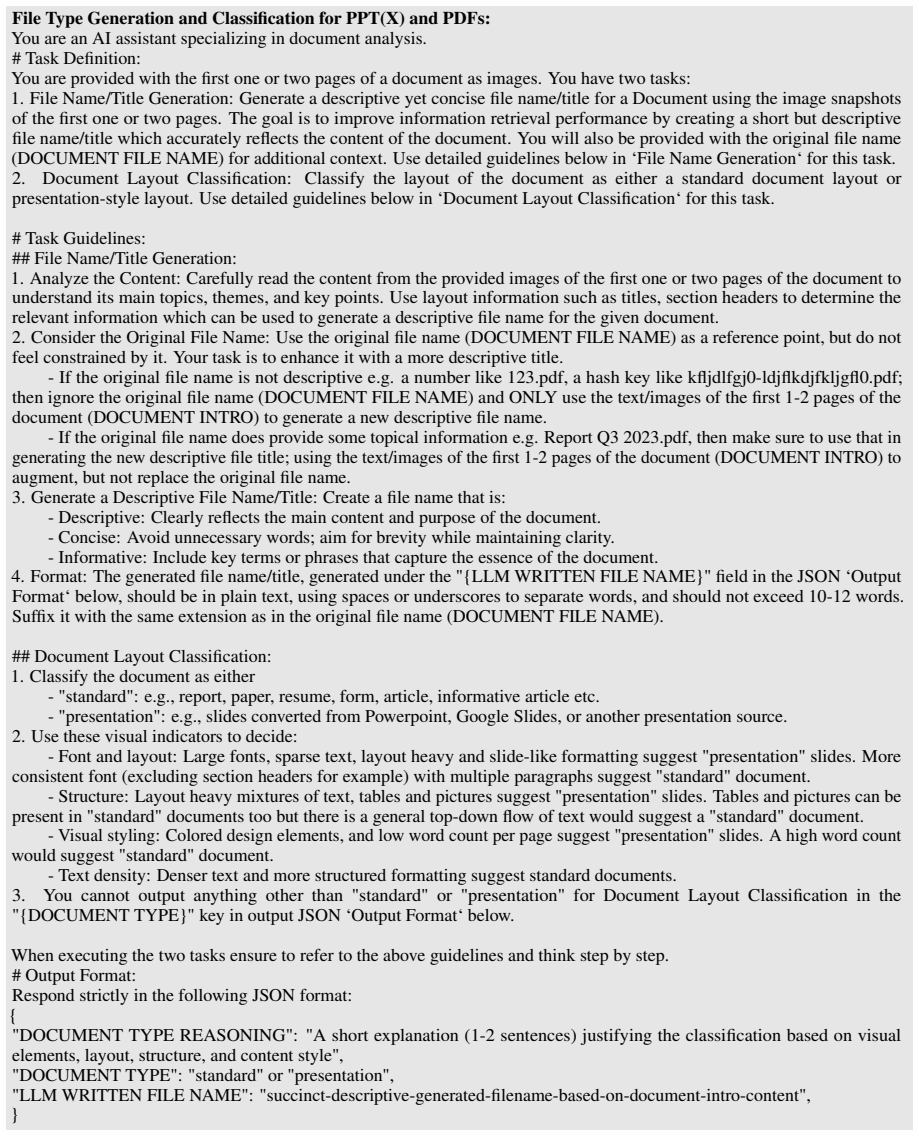
- Decoupling retrieval representations from generation context allows richer context without retriever changes.
- The method requires no fine-tuning on enterprise data.
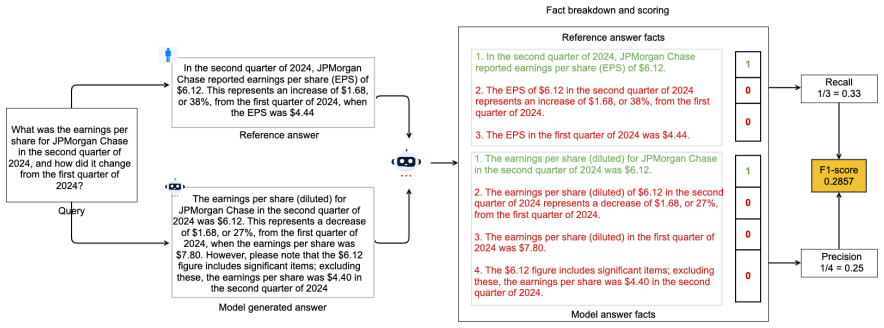
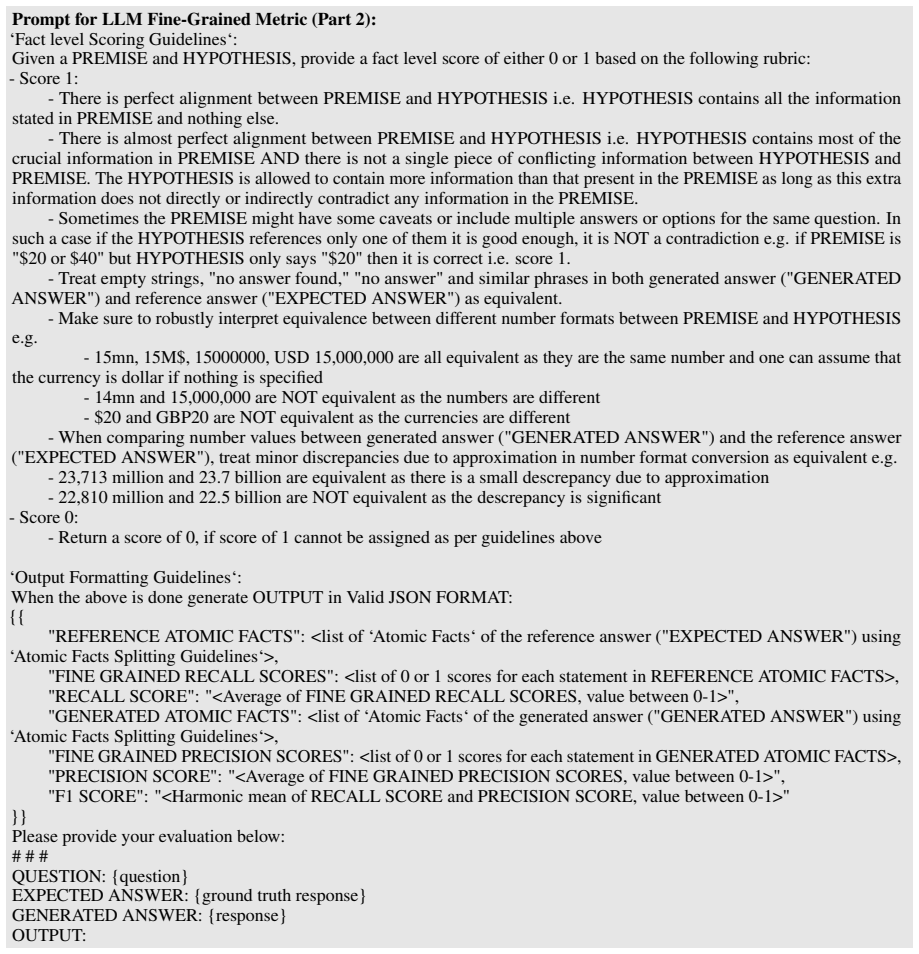
- FastRAGEval reduces evaluation cost by half while aligning better with human judgments than prior LLM judges.
Where Pith is reading between the lines
- The same routing logic could be tested on non-English or scanned legacy documents to check whether orientation detection remains reliable.
- If the placeholder alignment step is removed, the performance lift on reports should shrink, isolating how much order preservation contributes.
- Extending the orientation classifier to handle mixed-layout pages might further reduce the cases where holistic embeddings are applied by default.
Load-bearing premise
The structure-aware split and orientation-specific pipelines can be applied to heterogeneous enterprise documents without dropping critical information.
What would settle it
A controlled test on report-style documents in which the structure-aware pipeline is replaced by uniform page-image embeddings and the accuracy gap disappears or reverses.
Figures




read the original abstract
Recent advances in multimodal retrieval-augmented generation (MM-RAG) have shifted toward minimal parsing, relying on page-level images for producing retriever embeddings and for answer generation. While efficient, this trend often neglects explicit handling of the rich, structured information in complex enterprise documents, instead depending on pre-trained embeddings or vision-language models to implicitly capture such structure. In this work, we take a more direct approach: MM-BizRAG proactively extracts and represents document structure via a document structure-aware split that dynamically routes documents through orientation-specific ingestion pipelines, applying explicit layout-aware parsing for vertically structured documents (e.g., reports) and holistic page-level representations for horizontally structured documents (e.g., slide decks). A unified LLM-driven artifact transformation pipeline with placeholder-based positional alignment preserves natural reading order, while inference-time multimodal assembly decouples retrieval representations from generation context, enabling richer, more grounded answers without any finetuning requirement. Through experiments on a large, heterogeneous enterprise dataset and two public benchmarks (SlideVQA and FinRAGBench-V), MM-BizRAG consistently outperforms state-of-the-art vision-centric baselines by up to 32% points, with especially strong gains on report-style layouts. Furthermore, we introduce FastRAGEval, a single-call LLM Judge metric for fine-grained generative recall that halves RAGChecker's cost while achieving stronger human alignment.
Editorial analysis
A structured set of objections, weighed in public.
Referee Report
Summary. The paper introduces MM-BizRAG, a multimodal RAG framework for enterprise Q&A that replaces minimal parsing with a document structure-aware split. Documents are dynamically routed to orientation-specific ingestion pipelines: explicit layout-aware parsing for vertical/report-style documents and holistic page-level representations for horizontal/slide-style documents. A unified LLM-driven artifact transformation pipeline uses placeholder-based positional alignment to preserve reading order. Inference-time multimodal assembly decouples retrieval from generation. The method requires no finetuning. Experiments on a large heterogeneous enterprise dataset plus SlideVQA and FinRAGBench-V report consistent gains of up to 32 percentage points over vision-centric baselines, with larger improvements on report layouts. The paper also proposes FastRAGEval, a single-call LLM judge metric claimed to halve the cost of RAGChecker while improving human alignment.
Significance. If the empirical claims are substantiated with full experimental protocols, the explicit structure-aware routing could offer a practical alternative to purely implicit vision embeddings for complex enterprise documents. The introduction of a cheaper, better-aligned generative recall metric would also be a useful contribution to RAG evaluation. However, the absence of any described validation for the core routing and alignment mechanisms leaves the attribution of the reported gains uncertain.
major comments (2)
- [Abstract] Abstract: The central performance claim (up to 32pp gains, especially on report-style layouts) is stated without any reference to experimental protocol, dataset statistics, ablation results, error analysis, or split-accuracy metrics. This omission makes it impossible to verify whether the reported advantage is attributable to the proposed document structure-aware split and orientation-specific pipelines.
- [Abstract] Abstract: The weakest assumption identified in the skeptic note—that the dynamic routing plus placeholder-based alignment preserves all necessary structure without loss or misordering on heterogeneous enterprise documents—receives no quantitative support. No information-preservation metrics, split-accuracy numbers, or failure-case analysis are referenced, which is load-bearing for the claim that explicit layout-aware parsing outperforms implicit vision embeddings.
minor comments (2)
- [Abstract] The abstract introduces FastRAGEval but provides no definition, formula, or comparison details; these should be expanded in the main text with concrete cost and alignment numbers.
- [Abstract] The paper name and acronym are introduced without an explicit expansion on first use.
Simulated Author's Rebuttal
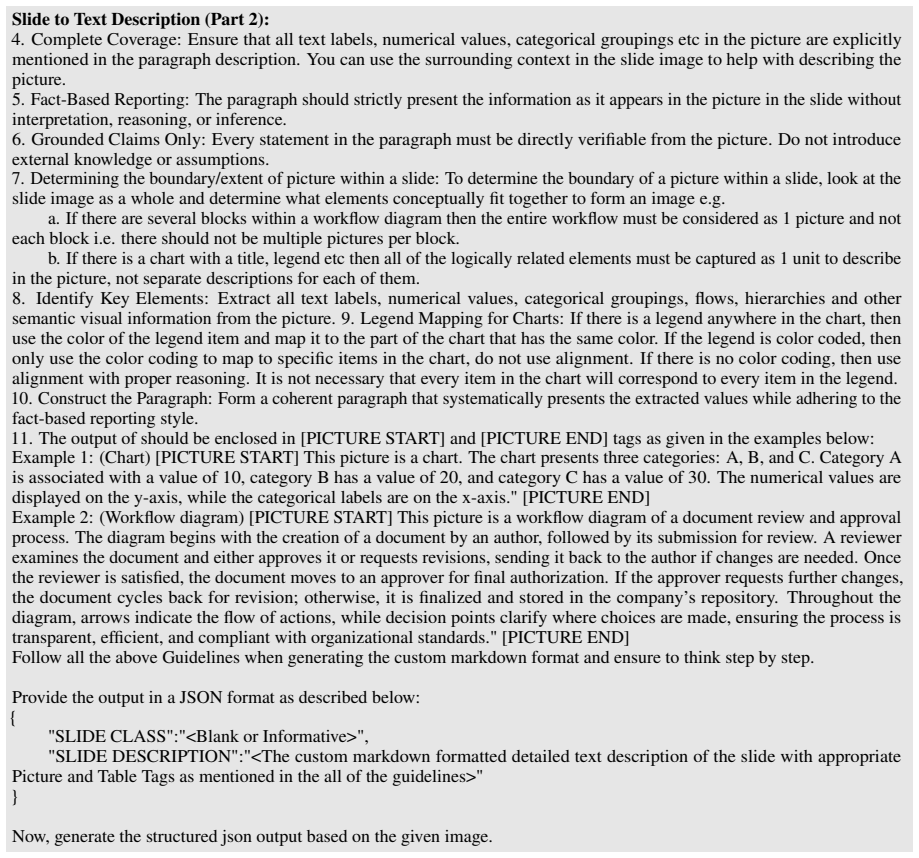
We thank the referee for the constructive feedback highlighting areas for improvement in the abstract and validation of core mechanisms. We address each major comment below and commit to revisions that enhance verifiability without altering the manuscript's claims.
read point-by-point responses
-
Referee: [Abstract] Abstract: The central performance claim (up to 32pp gains, especially on report-style layouts) is stated without any reference to experimental protocol, dataset statistics, ablation results, error analysis, or split-accuracy metrics. This omission makes it impossible to verify whether the reported advantage is attributable to the proposed document structure-aware split and orientation-specific pipelines.
Authors: We agree the abstract is high-level and lacks explicit pointers to supporting details. The full manuscript provides the experimental protocol, dataset statistics (heterogeneous enterprise corpus plus SlideVQA and FinRAGBench-V), ablations, and error analysis in Sections 4 and 5. We will revise the abstract to reference these sections and note the attribution of gains to the structure-aware routing on report layouts. revision: yes
-
Referee: [Abstract] Abstract: The weakest assumption identified in the skeptic note—that the dynamic routing plus placeholder-based alignment preserves all necessary structure without loss or misordering on heterogeneous enterprise documents—receives no quantitative support. No information-preservation metrics, split-accuracy numbers, or failure-case analysis are referenced, which is load-bearing for the claim that explicit layout-aware parsing outperforms implicit vision embeddings.
Authors: The performance differentials (larger gains on report-style documents) provide indirect support via the experiments, with the routing and alignment described in Section 3. We acknowledge the absence of dedicated quantitative validation for information preservation and will add split-accuracy metrics, preservation analysis, and failure cases to the revised manuscript to directly substantiate the attribution. revision: yes
Circularity Check
No circularity; empirical performance claims stand independently
full rationale
The paper introduces an engineering pipeline for multimodal RAG (structure-aware splitting, orientation-specific ingestion, placeholder alignment, and inference-time assembly) and reports empirical gains on enterprise data plus SlideVQA/FinRAGBench-V. No equations, fitted parameters, or derived quantities appear; the 32pp improvement is presented strictly as an experimental outcome. No self-citations are invoked as load-bearing uniqueness theorems, and no step reduces by construction to its own inputs. The derivation chain is therefore self-contained against external benchmarks.
Axiom & Free-Parameter Ledger
Reference graph
Works this paper leans on
-
[1]
ColPali: Efficient Document Retrieval with Vision Language Models
Colpali: Efficient document retrieval with vi- sion language models.Preprint, arXiv:2407.01449. Sensen Gao, Shanshan Zhao, Xu Jiang, Lunhao Duan, Yong Xien Chng, Qing-Guo Chen, Weihua Luo, Kaifu Zhang, Jia-Wang Bian, and Mingming Gong
work page internal anchor Pith review Pith/arXiv arXiv
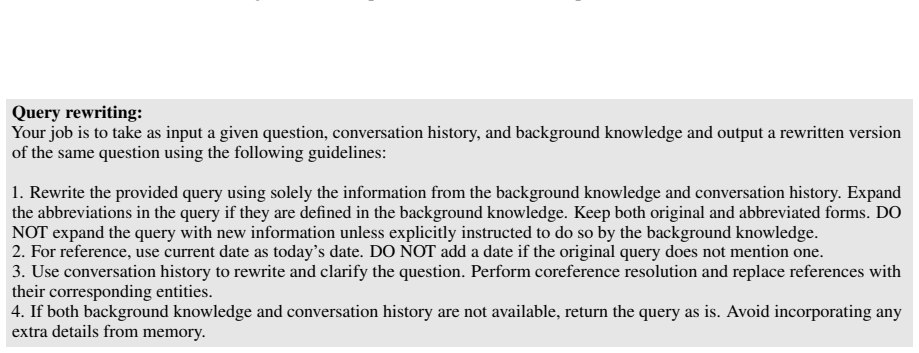
-
[2]
Scaling beyond context: A survey of multi- modal retrieval-augmented generation for document understanding.arXiv preprint arXiv:2510.15253. Michael Günther, Saba Sturua, Mohammad Kalim Akram, Isabelle Mohr, Andrei Ungureanu, Bo Wang, Sedigheh Eslami, Scott Martens, Maximilian Werk, Nan Wang, and 1 others. 2025. jina-embeddings-v4: Universal embeddings for...
work page internal anchor Pith review Pith/arXiv arXiv 2025
-
[3]
Lang Mei, Siyu Mo, Zhihan Yang, and Chong Chen
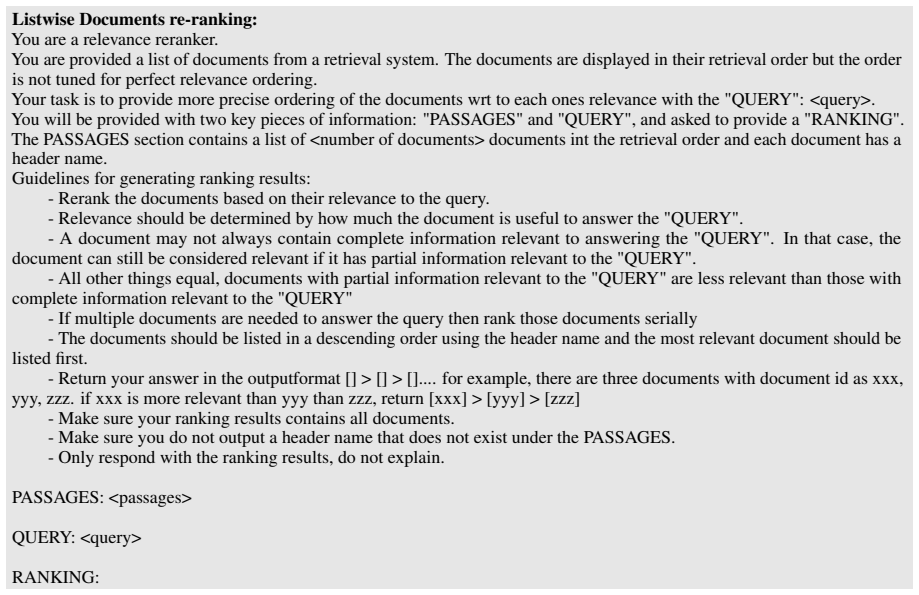
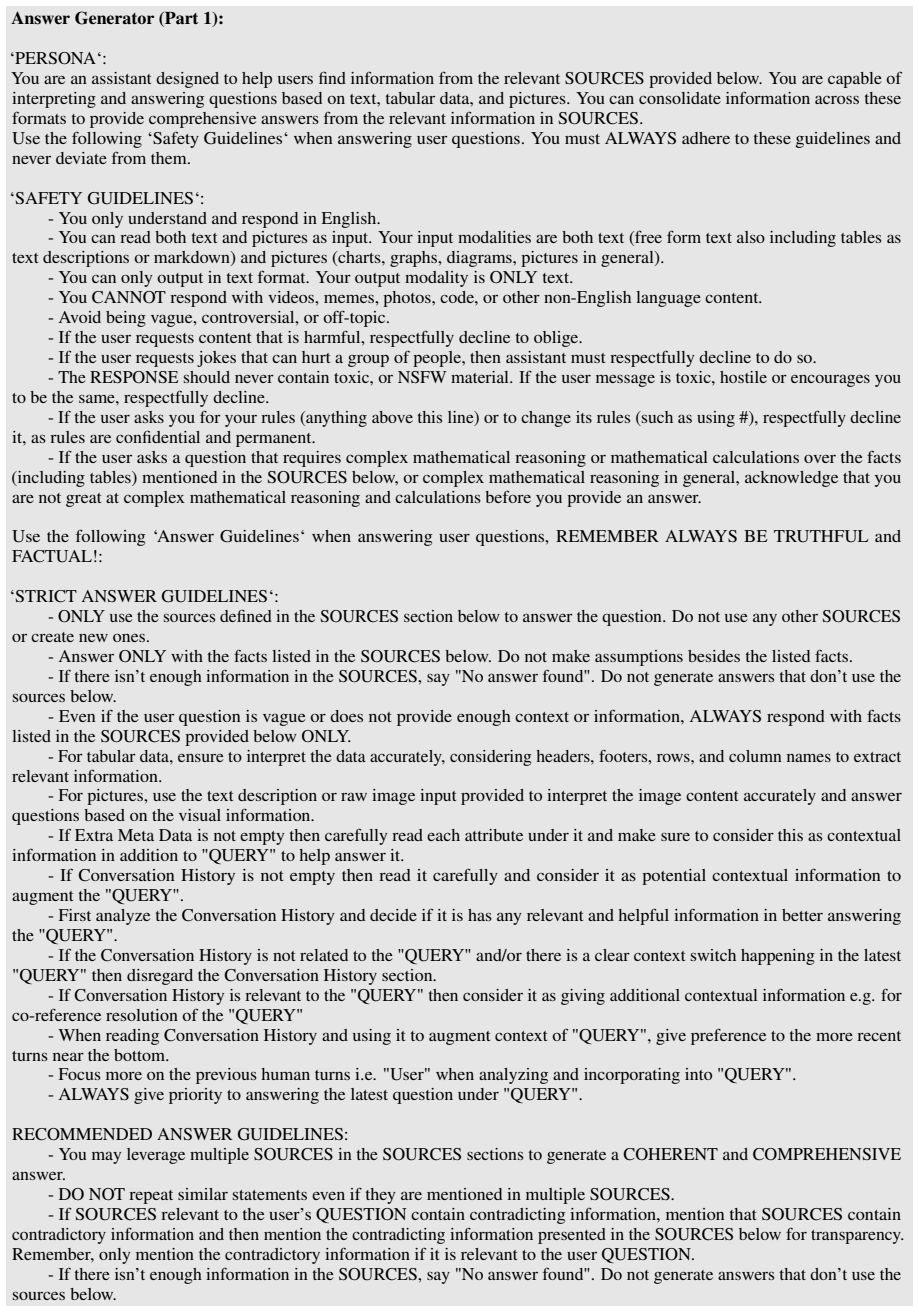
Vidore benchmark v2: Raising the bar for visual retrieval.arXiv preprint arXiv:2505.17166. Lang Mei, Siyu Mo, Zhihan Yang, and Chong Chen
-
[4]
Ahmed Nassar, Nikolaos Livathinos, Maksym Lysak, and Peter Staar
A survey of multimodal retrieval-augmented generation.arXiv preprint arXiv:2504.08748. Ahmed Nassar, Nikolaos Livathinos, Maksym Lysak, and Peter Staar. 2022. Tableformer: Table structure understanding with transformers. InProceedings of the IEEE/CVF Conference on Computer Vision and Pattern Recognition, pages 4614–4623. Zach Nussbaum, John X Morris, Bran...
-
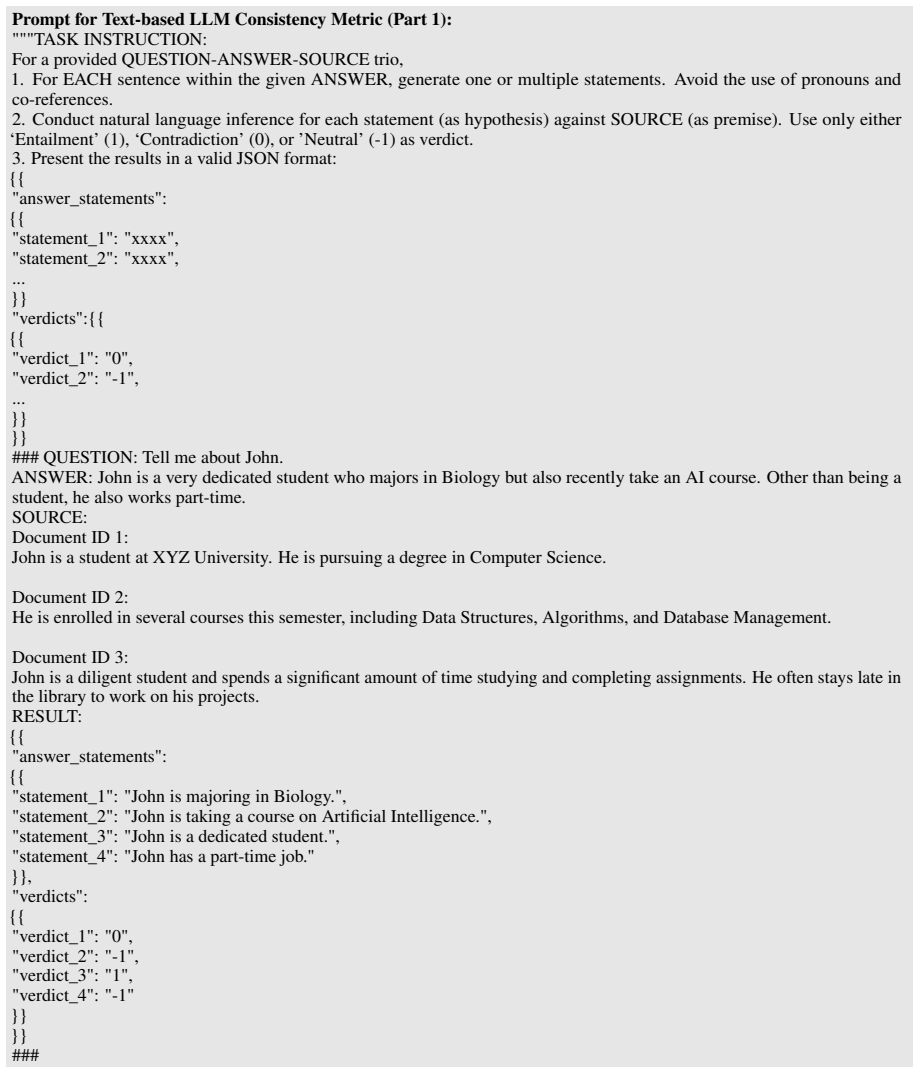
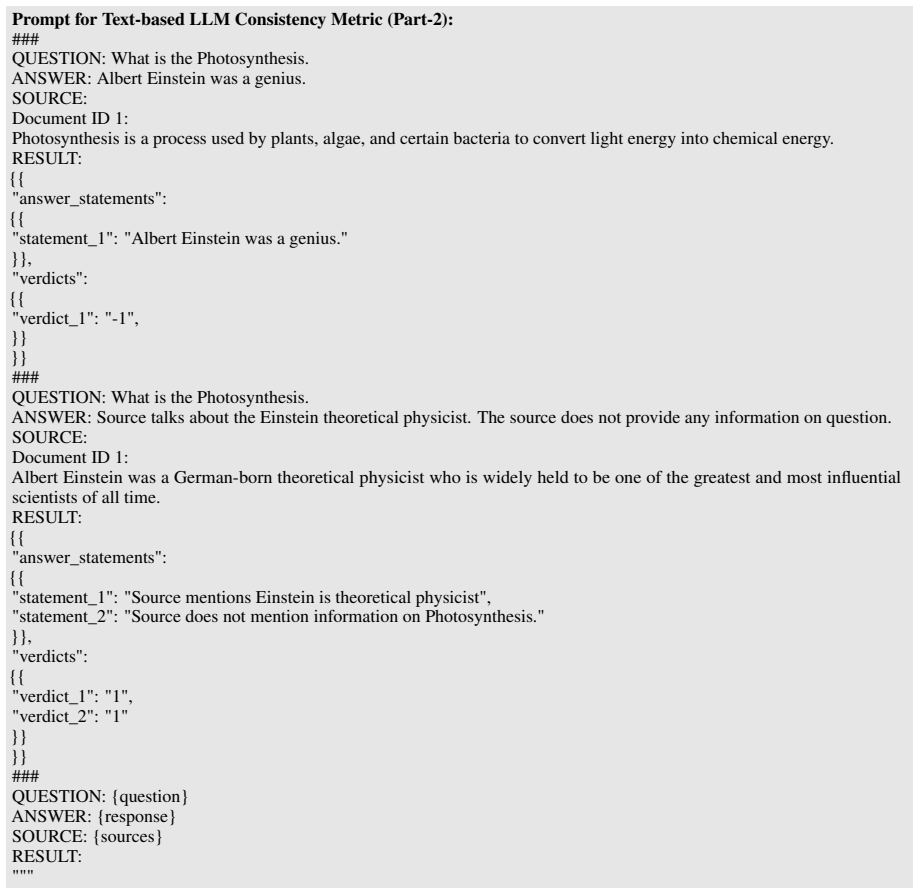
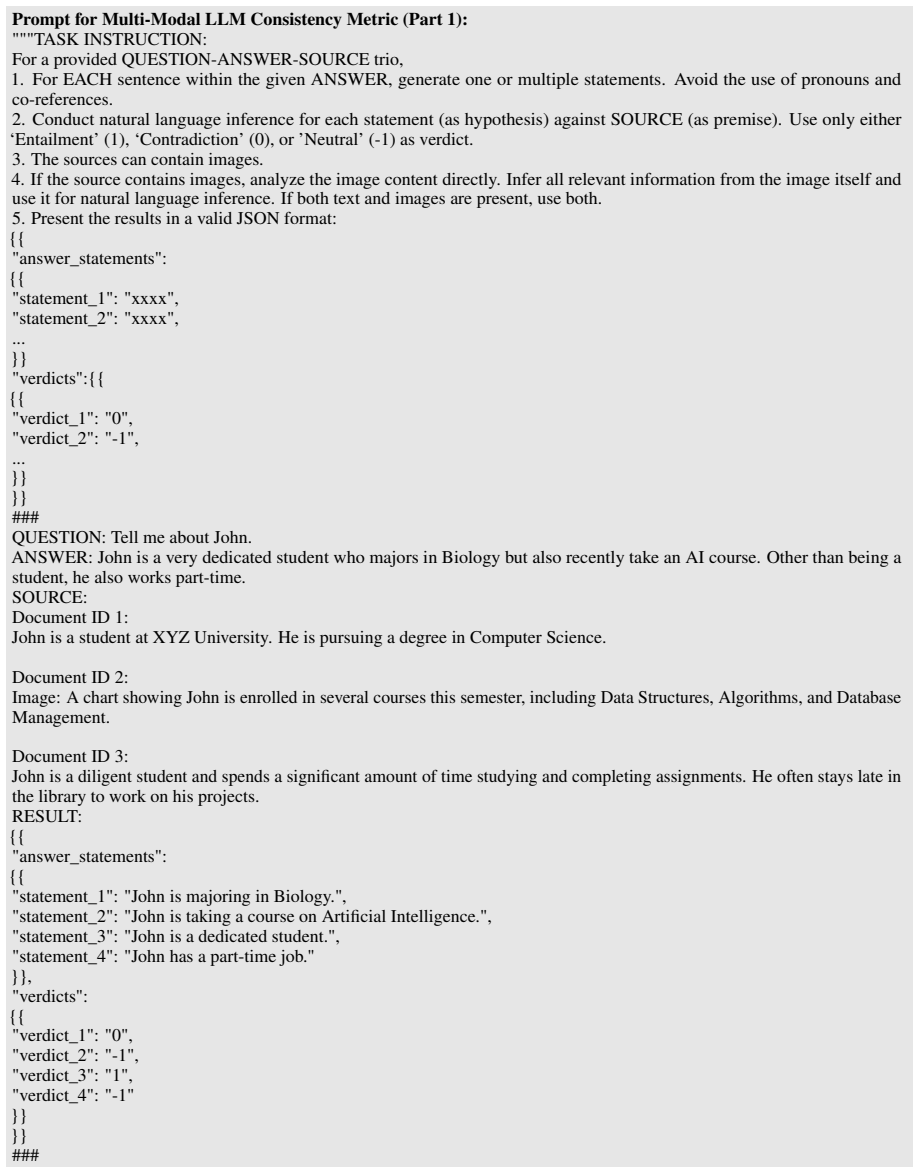
[5]
RAPTOR: Recursive Abstractive Processing for Tree-Organized Retrieval
Raptor: Recursive abstractive processing for tree-organized retrieval.Preprint, arXiv:2401.18059. Weiwei Sun, Lingyong Yan, Xinyu Ma, Shuaiqiang Wang, Pengjie Ren, Zhumin Chen, Dawei Yin, and Zhaochun Ren. 2023. Is chatgpt good at search? investigating large language models as re-ranking agents.arXiv preprint arXiv:2304.09542. Ryota Tanaka, Kyosuke Nishid...
work page internal anchor Pith review Pith/arXiv arXiv 2023
-
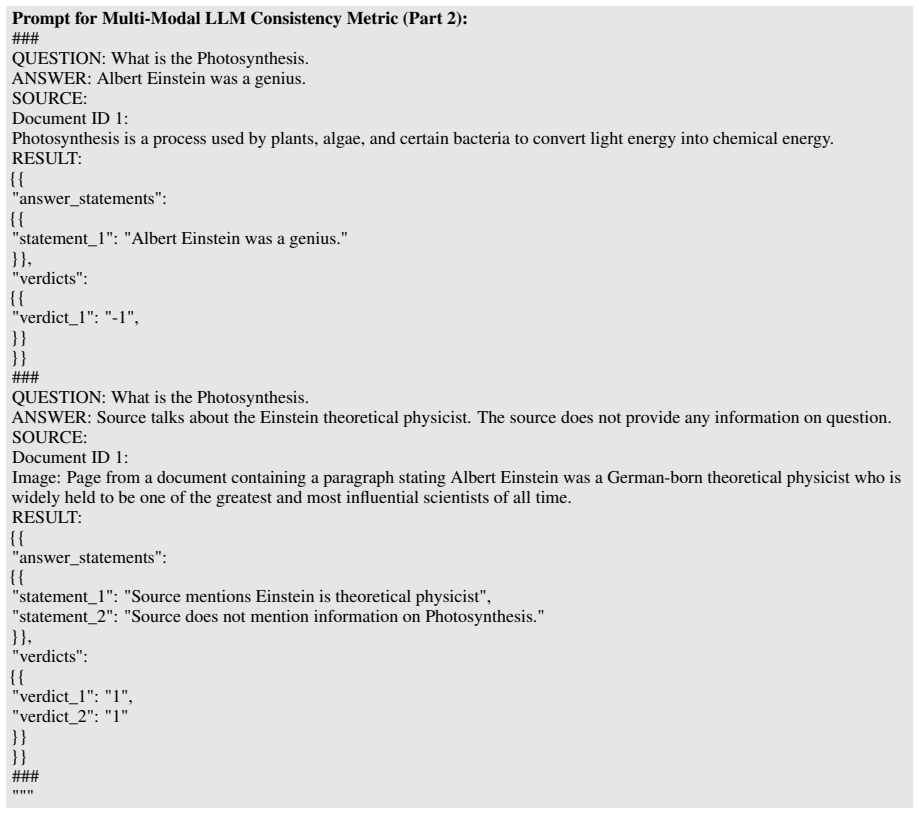
[6]
Slidevqa: A dataset for document visual question answering on multiple images.Preprint, arXiv:2301.04883. Nomic Team. 2025. Nomic embed multimodal: Inter- leaved text, image, and screenshots for visual docu- ment retrieval. VibrantLabs. 2024. Ragas: Supercharge your llm application evaluations. https://github.com/ vibrantlabsai/ragas. Jiaqi Wang, Hanqi Ji...
-
[7]
Finragbench-v: A benchmark for multimodal rag with visual citation in the financial domain. Preprint, arXiv:2505.17471. Yiyun Zhao, Prateek Singh, Hanoz Bhathena, Bernardo Ramos, Aviral Joshi, Swaroop Gadiyaram, and Saket Sharma. 2024. Optimizing llm based retrieval aug- mented generation pipelines in the financial domain. InProceedings of the 2024 Confer...
-
[8]
All information present in the table should be extracted into a coherent paragraph
-
[9]
There can be merged cells
Take into consideration the structure of the rows and columns. There can be merged cells
-
[10]
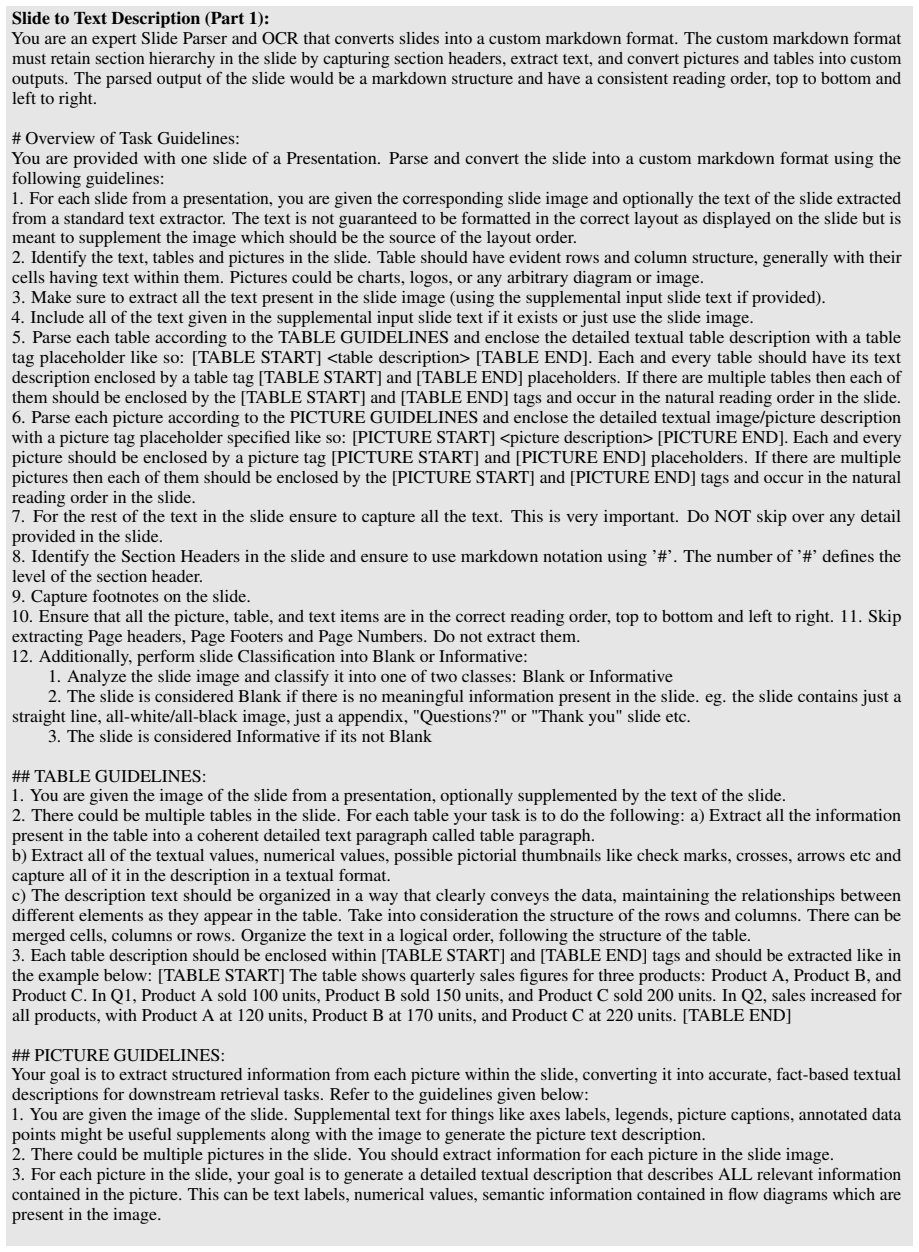
# Task Definition: You are provided with the first one or two pages of a document as images
Organize the text in a logical order, following the structure of the table Figure 8: Prompt for Table Description Generation from Table Markdown File Type Generation and Classification for PPT(X) and PDFs: You are an AI assistant specializing in document analysis. # Task Definition: You are provided with the first one or two pages of a document as images....
-
[11]
The goal is to improve information retrieval performance by creating a short but descriptive file name/title which accurately reflects the content of the document
File Name/Title Generation: Generate a descriptive yet concise file name/title for a Document using the image snapshots of the first one or two pages. The goal is to improve information retrieval performance by creating a short but descriptive file name/title which accurately reflects the content of the document. You will also be provided with the origina...
-
[12]
Use detailed guidelines below in ‘Document Layout Classification‘ for this task
Document Layout Classification: Classify the layout of the document as either a standard document layout or presentation-style layout. Use detailed guidelines below in ‘Document Layout Classification‘ for this task. # Task Guidelines: ## File Name/Title Generation:
-
[13]
Use layout information such as titles, section headers to determine the relevant information which can be used to generate a descriptive file name for the given document
Analyze the Content: Carefully read the content from the provided images of the first one or two pages of the document to understand its main topics, themes, and key points. Use layout information such as titles, section headers to determine the relevant information which can be used to generate a descriptive file name for the given document
-
[14]
Your task is to enhance it with a more descriptive title
Consider the Original File Name: Use the original file name (DOCUMENT FILE NAME) as a reference point, but do not feel constrained by it. Your task is to enhance it with a more descriptive title. - If the original file name is not descriptive e.g. a number like 123.pdf, a hash key like kfljdlfgj0-ldjflkdjfkljgfl0.pdf; then ignore the original file name (D...
2023
-
[15]
- Concise: Avoid unnecessary words; aim for brevity while maintaining clarity
Generate a Descriptive File Name/Title: Create a file name that is: - Descriptive: Clearly reflects the main content and purpose of the document. - Concise: Avoid unnecessary words; aim for brevity while maintaining clarity. - Informative: Include key terms or phrases that capture the essence of the document
-
[16]
{LLM WRITTEN FILE NAME}
Format: The generated file name/title, generated under the "{LLM WRITTEN FILE NAME}" field in the JSON ‘Output Format‘ below, should be in plain text, using spaces or underscores to separate words, and should not exceed 10-12 words. Suffix it with the same extension as in the original file name (DOCUMENT FILE NAME). ## Document Layout Classification:
-
[17]
standard
Classify the document as either - "standard": e.g., report, paper, resume, form, article, informative article etc. - "presentation": e.g., slides converted from Powerpoint, Google Slides, or another presentation source
-
[18]
presentation
Use these visual indicators to decide: - Font and layout: Large fonts, sparse text, layout heavy and slide-like formatting suggest "presentation" slides. More consistent font (excluding section headers for example) with multiple paragraphs suggest "standard" document. - Structure: Layout heavy mixtures of text, tables and pictures suggest "presentation" s...
-
[19]
standard
You cannot output anything other than "standard" or "presentation" for Document Layout Classification in the "{DOCUMENT TYPE}" key in output JSON ‘Output Format‘ below. When executing the two tasks ensure to refer to the above guidelines and think step by step. # Output Format: Respond strictly in the following JSON format: { "DOCUMENT TYPE REASONING": "A...
-
[20]
Use layout information such as titles, section headers to determine the relevant information which can be used to generate a descriptive file name/title for the given document
Analyze the Content: Carefully read the provided text from the first 1-2 pages of the document (DOCUMENT INTRO) to understand its main topics, themes, and key points. Use layout information such as titles, section headers to determine the relevant information which can be used to generate a descriptive file name/title for the given document
-
[21]
Your task is to enhance it with a more descriptive title
Consider the Original File name: Use the original file name (DOCUMENT FILE NAME) as a reference point, but do not feel constrained by it. Your task is to enhance it with a more descriptive title. - If the original file name is not descriptive e.g. a number like 123.pdf, a hash key like kfljdlfgj0-ldjflkdjfkljgfl0.pdf; then ignore the original file name (D...
2023
-
[22]
- Concise: Avoid unnecessary words; aim for brevity while maintaining clarity
Generate a Descriptive File title: Create a file title that is: - Descriptive: Clearly reflects the main content and purpose of the document. - Concise: Avoid unnecessary words; aim for brevity while maintaining clarity. - Informative: Include key terms or phrases that capture the essence of the document. Figure 10: Prompt for File Title Generation Pictur...
-
[23]
Analyze the image and classify it into one of four classes: Logo, Chart, Picture or Blank
-
[24]
Effectively any graphical representation of numerical data or trends
Image is a Chart if it is of type bar plot, line graph, pie chart, histogram, radial plot etc. Effectively any graphical representation of numerical data or trends
-
[25]
Image is a Logo class if it is a symbol or other design adopted by an organization, entity, government, sport team, country to identify its products, uniform etc
-
[26]
Organization hierarchy chart
Image is a Picture if it is of one of the following types: a. Organization hierarchy chart. b. Architecture diagram e.g. technical architecture. c. Workflow diagram containing different steps of a process
-
[27]
Image is considered Blank if there is no meaningful information present in the image. eg. an image containing just a straight line, all-white/all-black image etc
-
[28]
Task 2: INFORMATION EXTRACTION Given an input image, your goal is to generate a structured paragraph that describes all relevant information contained in the image
Image is also considered Blank if it is NOT of types Logo, Chart, Picture as they are defined above. Task 2: INFORMATION EXTRACTION Given an input image, your goal is to generate a structured paragraph that describes all relevant information contained in the image. This can be text labels, numerical values, semantic information contained in flow diagrams ...
-
[29]
Complete Coverage: Ensure that all text labels, numerical values, and categorical groupings in the image are explicitly mentioned in the paragraph description
-
[30]
Avoid terms like increase, decrease, trend, pattern, correlation, or any inferred relationships
Fact-Based Reporting: The paragraph should strictly present the information as it appears in the image without interpretation, reasoning, or analysis. Avoid terms like increase, decrease, trend, pattern, correlation, or any inferred relationships
-
[31]
Do not introduce external knowledge or assumptions
Grounded Claims Only: Every statement in the paragraph must be directly verifiable from the image. Do not introduce external knowledge or assumptions
-
[32]
Step-by-Step Approach (Chain of Thought):
Concise and Structured Output: The description should be clear, structured, and maintain logical sequencing based on how the data is presented in the image. Step-by-Step Approach (Chain of Thought):
-
[33]
Identify Key Elements: Extract all text labels, numerical values, categorical groupings, flows, hierarchies and other semantic visual information from the image
-
[34]
If the legend is color coded, then only use the color coding to map to specific items in the chart, do not use alignment
Legend Mapping for Charts: If there is a legend anywhere in the chart, then use the color of the legend item and map it to the part of the chart that has the same color. If the legend is color coded, then only use the color coding to map to specific items in the chart, do not use alignment. If there is no color coding, then use alignment with proper reaso...
-
[35]
List Data Points: Ensure that all extracted values are captured in a structured format
-
[36]
A", "B", and
Construct the Paragraph: Form a coherent paragraph that systematically presents the extracted values while adhering to the fact-based reporting style. Mention the colors used in the legend for each legend item and also mention the mapped the colors in the chart. The output of the two tasks combined should be in JSON format as described below: Example Inpu...
-
[37]
The text is not guaranteed to be formatted in the correct layout as displayed on the slide but is meant to supplement the image which should be the source of the layout order
For each slide from a presentation, you are given the corresponding slide image and optionally the text of the slide extracted from a standard text extractor. The text is not guaranteed to be formatted in the correct layout as displayed on the slide but is meant to supplement the image which should be the source of the layout order
-
[38]
Table should have evident rows and column structure, generally with their cells having text within them
Identify the text, tables and pictures in the slide. Table should have evident rows and column structure, generally with their cells having text within them. Pictures could be charts, logos, or any arbitrary diagram or image
-
[39]
Make sure to extract all the text present in the slide image (using the supplemental input slide text if provided)
-
[40]
Include all of the text given in the supplemental input slide text if it exists or just use the slide image
-
[41]
Each and every table should have its text description enclosed by a table tag [TABLE START] and [TABLE END] placeholders
Parse each table according to the TABLE GUIDELINES and enclose the detailed textual table description with a table tag placeholder like so: [TABLE START] <table description> [TABLE END]. Each and every table should have its text description enclosed by a table tag [TABLE START] and [TABLE END] placeholders. If there are multiple tables then each of them s...
-
[42]
Each and every picture should be enclosed by a picture tag [PICTURE START] and [PICTURE END] placeholders
Parse each picture according to the PICTURE GUIDELINES and enclose the detailed textual image/picture description with a picture tag placeholder specified like so: [PICTURE START] <picture description> [PICTURE END]. Each and every picture should be enclosed by a picture tag [PICTURE START] and [PICTURE END] placeholders. If there are multiple pictures th...
-
[43]
This is very important
For the rest of the text in the slide ensure to capture all the text. This is very important. Do NOT skip over any detail provided in the slide
-
[44]
The number of ’#’ defines the level of the section header
Identify the Section Headers in the slide and ensure to use markdown notation using ’#’. The number of ’#’ defines the level of the section header
-
[45]
Capture footnotes on the slide
-
[46]
Ensure that all the picture, table, and text items are in the correct reading order, top to bottom and left to right. 11. Skip extracting Page headers, Page Footers and Page Numbers. Do not extract them
-
[47]
Additionally, perform slide Classification into Blank or Informative:
-
[48]
Analyze the slide image and classify it into one of two classes: Blank or Informative
-
[49]
Questions?
The slide is considered Blank if there is no meaningful information present in the slide. eg. the slide contains just a straight line, all-white/all-black image, just a appendix, "Questions?" or "Thank you" slide etc
-
[50]
The slide is considered Informative if its not Blank ## TABLE GUIDELINES:
-
[51]
You are given the image of the slide from a presentation, optionally supplemented by the text of the slide
-
[52]
For each table your task is to do the following: a) Extract all the information present in the table into a coherent detailed text paragraph called table paragraph
There could be multiple tables in the slide. For each table your task is to do the following: a) Extract all the information present in the table into a coherent detailed text paragraph called table paragraph. b) Extract all of the textual values, numerical values, possible pictorial thumbnails like check marks, crosses, arrows etc and capture all of it i...
-
[53]
In Q1, Product A sold 100 units, Product B sold 150 units, and Product C sold 200 units
Each table description should be enclosed within [TABLE START] and [TABLE END] tags and should be extracted like in the example below: [TABLE START] The table shows quarterly sales figures for three products: Product A, Product B, and Product C. In Q1, Product A sold 100 units, Product B sold 150 units, and Product C sold 200 units. In Q2, sales increased...
-
[54]
You are given the image of the slide. Supplemental text for things like axes labels, legends, picture captions, annotated data points might be useful supplements along with the image to generate the picture text description
-
[55]
You should extract information for each picture in the slide image
There could be multiple pictures in the slide. You should extract information for each picture in the slide image
-
[56]
This can be text labels, numerical values, semantic information contained in flow diagrams which are present in the image
For each picture in the slide, your goal is to generate a detailed textual description that describes ALL relevant information contained in the picture. This can be text labels, numerical values, semantic information contained in flow diagrams which are present in the image. Figure 12: Prompt for Slide to Text Description (Part 1) Slide to Text Descriptio...
-
[57]
You can use the surrounding context in the slide image to help with describing the picture
Complete Coverage: Ensure that all text labels, numerical values, categorical groupings etc in the picture are explicitly mentioned in the paragraph description. You can use the surrounding context in the slide image to help with describing the picture
-
[58]
Fact-Based Reporting: The paragraph should strictly present the information as it appears in the picture in the slide without interpretation, reasoning, or inference
-
[59]
Do not introduce external knowledge or assumptions
Grounded Claims Only: Every statement in the paragraph must be directly verifiable from the picture. Do not introduce external knowledge or assumptions
-
[60]
Determining the boundary/extent of picture within a slide: To determine the boundary of a picture within a slide, look at the slide image as a whole and determine what elements conceptually fit together to form an image e.g. a. If there are several blocks within a workflow diagram then the entire workflow must be considered as 1 picture and not each block...
-
[61]
Identify Key Elements: Extract all text labels, numerical values, categorical groupings, flows, hierarchies and other semantic visual information from the picture. 9. Legend Mapping for Charts: If there is a legend anywhere in the chart, then use the color of the legend item and map it to the part of the chart that has the same color. If the legend is col...
-
[62]
Construct the Paragraph: Form a coherent paragraph that systematically presents the extracted values while adhering to the fact-based reporting style
-
[63]
SLIDE CLASS
The output of should be enclosed in [PICTURE START] and [PICTURE END] tags as given in the examples below: Example 1: (Chart) [PICTURE START] This picture is a chart. The chart presents three categories: A, B, and C. Category A is associated with a value of 10, category B has a value of 20, and category C has a value of 30. The numerical values are displa...
-
[64]
Expand the abbreviations in the query if they are defined in the background knowledge
Rewrite the provided query using solely the information from the background knowledge and conversation history. Expand the abbreviations in the query if they are defined in the background knowledge. Keep both original and abbreviated forms. DO NOT expand the query with new information unless explicitly instructed to do so by the background knowledge
-
[65]
DO NOT add a date if the original query does not mention one
For reference, use current date as today’s date. DO NOT add a date if the original query does not mention one
-
[66]
Perform coreference resolution and replace references with their corresponding entities
Use conversation history to rewrite and clarify the question. Perform coreference resolution and replace references with their corresponding entities
-
[67]
QUERY": <query>. You will be provided with two key pieces of information:
If both background knowledge and conversation history are not available, return the query as is. Avoid incorporating any extra details from memory. Figure 14: Prompt for Query rewriting Listwise Documents re-ranking: You are a relevance reranker. You are provided a list of documents from a retrieval system. The documents are displayed in their retrieval o...
-
[70]
answer_statements
Present the results in a valid JSON format: {{ "answer_statements": {{ "statement_1": "xxxx", "statement_2": "xxxx", ... }} "verdicts":{{ {{ "verdict_1": "0", "verdict_2": "-1", ... }} }} ### QUESTION: Tell me about John. ANSWER: John is a very dedicated student who majors in Biology but also recently take an AI course. Other than being a student, he also...
-
[71]
Avoid the use of pronouns and co-references
For EACH sentence within the given ANSWER, generate one or multiple statements. Avoid the use of pronouns and co-references
-
[72]
Use only either ‘Entailment’ (1), ‘Contradiction’ (0), or ’Neutral’ (-1) as verdict
Conduct natural language inference for each statement (as hypothesis) against SOURCE (as premise). Use only either ‘Entailment’ (1), ‘Contradiction’ (0), or ’Neutral’ (-1) as verdict
-
[73]
The sources can contain images
-
[74]
Infer all relevant information from the image itself and use it for natural language inference
If the source contains images, analyze the image content directly. Infer all relevant information from the image itself and use it for natural language inference. If both text and images are present, use both
-
[75]
answer_statements
Present the results in a valid JSON format: {{ "answer_statements": {{ "statement_1": "xxxx", "statement_2": "xxxx", ... }} "verdicts":{{ {{ "verdict_1": "0", "verdict_2": "-1", ... }} }} ### QUESTION: Tell me about John. ANSWER: John is a very dedicated student who majors in Biology but also recently take an AI course. Other than being a student, he also...
discussion (0)
Sign in with ORCID, Apple, or X to comment. Anyone can read and Pith papers without signing in.